Robot Fleet Management: Automation, Monitoring, and Security
Introduction
Robot fleet management helps teams control many robots from one place. It gives teams a clear view of robot work, health, and status. This makes robot operations easier to manage each day.
Modern warehouses and factories may use many robots. These robots can move goods, carry items, or perform routine tasks. Without proper control, small robot issues can slow down the whole system.
A robot fleet system helps teams watch these machines in real time. It can also help teams find errors and plan robot tasks. This gives workers better control over daily robot operations.
What Is Robot Fleet Management?
Robot fleet management is a system for managing many robots together. It helps teams track robot status, location, tasks, and performance. The system can connect data from many robots in one place.
Each robot may perform a different task during the day. Some robots may carry goods, while others move materials. Fleet software helps coordinate these tasks and reduce work conflicts.
For example, a warehouse may use 50 mobile robots. The system can show which robots are busy and which are free. It can also show robots that need charging or human help.
Why Is Robot Fleet Management Important?
Managing one robot can be simple for a small team. Managing hundreds of robots can become much harder. Teams need a clear way to track machines and their work.
Fleet management gives teams better control over robot operations. It can reduce manual checks and help workers find problems faster. It also gives useful data about robot activity.
Imagine a warehouse where ten robots stop working. Without a central system, workers may check each robot one by one. A fleet system can show the problem quickly and help workers respond sooner.
How Does Robot Fleet Management Work?
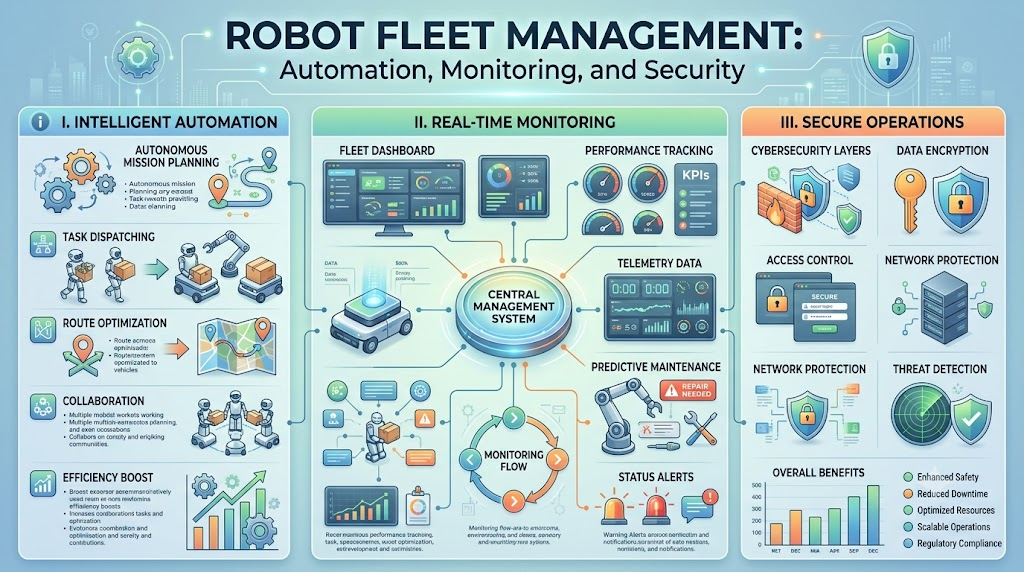
A fleet management system collects data from connected robots. The system can receive information about location, battery level, tasks, and errors. It then shows this data through a central control system.
The software can also send tasks to different robots. It may decide which robot should handle a task first. This choice can depend on location, battery level, workload, or robot type.
For example, a robot near a loading area may get the next delivery task. Another robot with low battery may move to a charging station. This helps keep robot work smooth and balanced.
Key Features of Robot Fleet Management
A good fleet system provides several useful features. Robot tracking helps teams see where machines are working. Task management helps teams assign work and follow task progress.
Health monitoring is also important for large robot fleets. Teams can check battery levels, errors, and machine status. Alerts can warn workers when a robot needs attention.
Some systems also provide reports and performance data. These reports can show delays, idle time, and task completion. Teams can use this data to improve daily robot operations.
Robot Scheduling and Task Management
Robot scheduling helps decide which robot should perform each task. The system can consider robot location, workload, battery level, and task priority. This helps prevent poor task choices.
Task management also helps teams track work from start to finish. Workers can see pending tasks, active tasks, and completed tasks. This makes daily operations easier to understand.
For example, a warehouse may receive 100 delivery requests. The fleet system can divide these tasks among available robots. It can also avoid sending many robots to the same area.
Robot Traffic Management
Many robots working in one area can create traffic problems. Robots may block paths or reach the same area at once. Traffic management helps reduce these problems.
A fleet system can plan routes for different robots. It can help robots avoid busy paths and reduce unnecessary movement. This can make robot operations safer and more efficient.
For example, three robots may need to cross one narrow path. The system can control their movement and order their trips. This helps prevent waiting and route conflicts.
Robot Health Monitoring
Robot health monitoring helps teams check machine condition. It can track battery levels, system errors, sensors, and other useful data. This information helps teams spot problems early.
Early warnings can reduce unexpected downtime. A team may notice that one robot has a weak battery. Workers can service the robot before it stops during an important task.
Regular monitoring also helps teams plan maintenance work. Instead of waiting for a failure, teams can act earlier. This can support more stable robot operations.
Benefits of Robot Fleet Management
Robot fleet management can make large robot operations easier. It gives teams one place to watch machines and tasks. This can reduce the need for manual checks.
Better coordination can also improve the use of available robots. Teams can see idle robots and assign them useful work. They can also identify robots that need service or charging.
The main benefits can include:
- Better robot visibility
- Easier task control
- Faster issue detection
- Improved robot coordination
- Better use of fleet data
- Easier maintenance planning
Challenges in Managing Robot Fleets
Robot fleet management also has some challenges. Different robots may use different software and communication methods. Connecting these robots to one system can take careful planning.
Large fleets can also create a lot of data. Teams need systems that can process this data without slowing down operations. Strong security is also important when robots connect to business networks.
Staff training is another important factor. Workers need to understand the fleet system and its alerts. Simple dashboards and clear messages can make the system easier to use.
How Robot Fleet Management Helps Warehouses
Warehouses often use robots for moving goods and materials. Fleet management helps coordinate these machines across busy work areas. It can also help workers track robot activity.
A warehouse may have robots working near shelves, packing areas, and loading zones. Each area may have different traffic and task needs. Fleet software can help manage these tasks from one system.
For example, a robot can collect an item from storage. Another robot can move the item toward packing. The system can coordinate both tasks and reduce unnecessary movement.
How Robot Fleet Management Supports Factories
Factories can use robots for material movement and routine work. Fleet systems help teams manage these robots during production. They can also provide useful information about robot activity.
A factory may have robots moving parts between different production areas. The robots must arrive at the right place at the right time. Poor coordination can create delays in production.
Fleet management helps teams track these movements. It can show task progress and robot status. This gives workers better visibility into automated operations.
The Role of Data in Robot Fleet Management
Data plays an important role in fleet management. Robots can create data about tasks, routes, battery use, errors, and downtime. Teams can study this data to understand daily operations.
Good data can help teams find repeated problems. For example, one route may cause frequent delays. The team can study the data and change the route.
Data can also support long-term planning. Teams can learn when robots need more charging or maintenance. This can help improve fleet planning as the robot fleet grows.
Security in Robot Fleet Management
Robot systems can connect with business networks and other software. This makes security an important part of fleet management. Teams need to protect robot data and system access.
Access controls can limit who can change robot settings. Strong passwords and secure connections can also reduce security risks. Teams should also keep software updated when updates are available.
Security checks should be part of normal robot operations. Workers should know how to report unusual system activity. A clear security process can help protect the whole robot fleet.
How to Choose a Robot Fleet Management System
Teams should first understand their robot fleet and daily needs. They should consider the number of robots, robot types, work areas, and task volume. These factors can guide system selection.
The system should also be easy for workers to use. Clear dashboards can help teams understand robot status quickly. Good integration support can also help connect different robot systems.
Future growth should also be considered. A small fleet may become much larger over time. Choosing a system that can grow with the business can reduce future system changes.
Future of Robot Fleet Management
Robot fleets are becoming more connected and automated. Future systems may use better data tools and smarter task planning. This can help robots work together with less human control.
Artificial intelligence may also support better route and task decisions. Systems can learn from past robot activity and changing work conditions. This may help improve fleet performance over time.
Human workers will still play an important role. They will monitor systems, handle unusual problems, and manage key decisions. The goal is to help people manage robots more easily.
Conclusion
Robot fleet management helps businesses control many robots from one system. It provides better visibility into tasks, robot health, routes, and performance. This can make large robot operations easier to manage.
Warehouses and factories can use fleet systems to reduce manual work. They can also use robot data to find problems and improve daily processes. Good planning is important when building a robot fleet.
As robot use grows, fleet management will become more useful. Businesses need simple tools that support safe and reliable robot work. A well-managed fleet can help teams get more value from automation.
Leave a Reply